
Game Dev Audio Engine Basic
A downloadable tool for Windows and Linux
Game Dev Audio Engine — Basic vs. Advanced
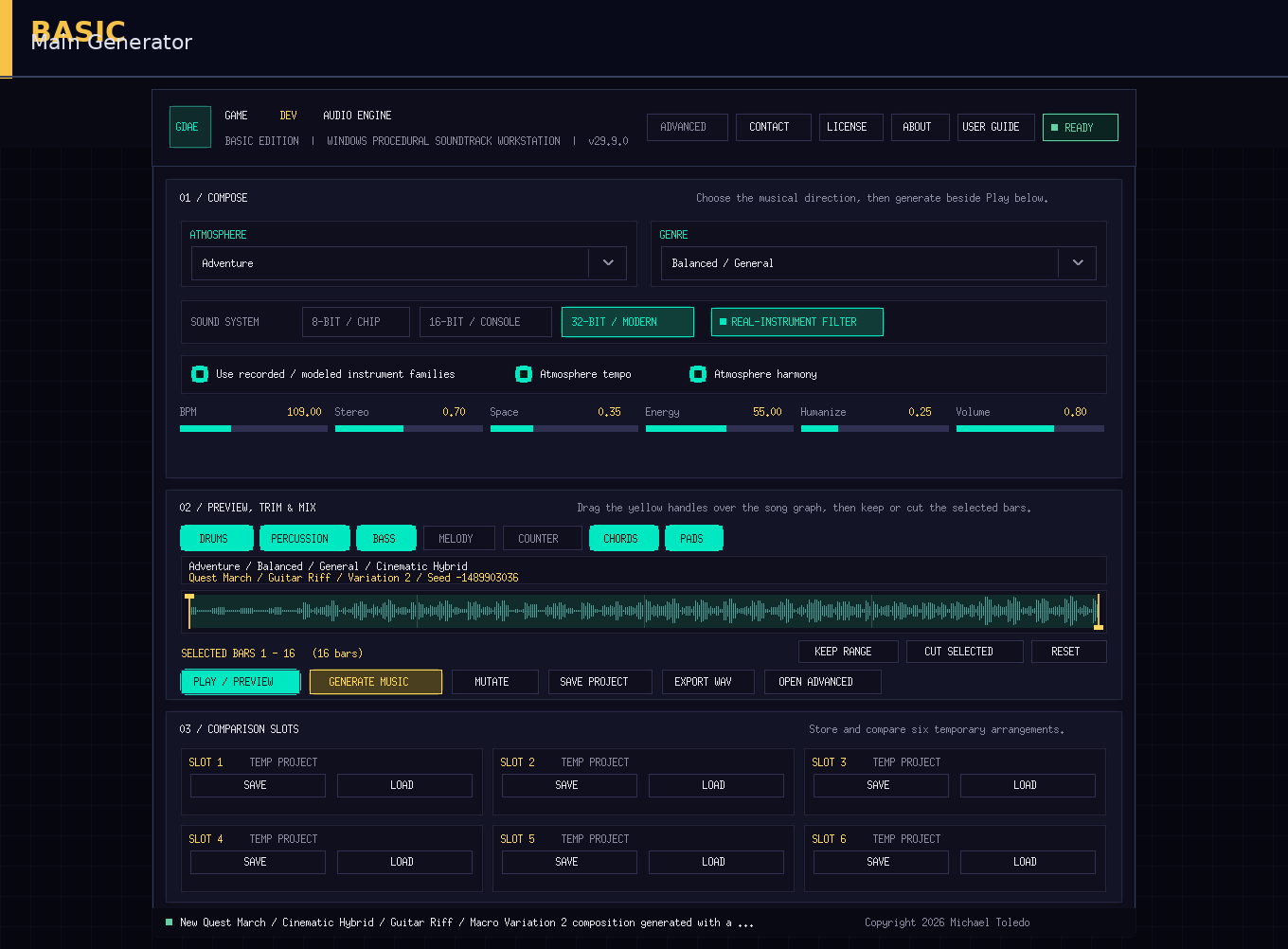
Advanced includes everything available in Basic. Both editions use the same full-quality music-generation engine, MuseScore instrument library, genre system, atmosphere system, composers, and no-fallback sample routing.
Basic Edition
Music generation
- Generate complete approximately 30-second game-music cues.
- Use all 32 atmospheres.
- Use all 23 genres and 92 subgenres.
- Use all eight atmosphere composers and their internal variations.
- Use the genre-aware Cue Identity system:
- Guitar Riff
- Interlocking Groove
- Bass Figure
- Chord Rhythm
- Ostinato
- Harmonic Motion
- Evolving Texture
- Orchestration Gesture
- Generate music that remains complete with Melody and Countermelody disabled.
- Generate thousands of different compositions from procedural seeds.
- Maintain exact genre-appropriate instrument routing.
- Use the strict no-fallback instrument system.
Sound systems and instruments
- 8-bit Chip sound system.
- 16-bit Console sound system.
- 32-bit Modern sampled sound system.
- Full embedded MuseScore General instrument library.
- Recorded and modeled instrument-family option.
- Exact instrument, note, bank, and articulation routing.
- Full-quality guitar, bass, drum, string, keyboard, orchestral, synth, and world-instrument rendering.
Basic does not receive deliberately reduced instrument or audio quality.
Main generation controls
- Select Atmosphere.
- Select Genre.
- Automatically receive a matching Subgenre.
- Use automatic Atmosphere Tempo.
- Use automatic Atmosphere Harmony.
- Manually adjust BPM.
- Adjust Stereo width.
- Adjust Space and reverb.
- Adjust Energy and arrangement density.
- Adjust Humanization.
- Adjust master Volume.
- Enable or disable real-instrument-oriented generation.
Layer controls
Enable or disable:
- Drums
- Percussion
- Bass
- Chords
- Pads
- Melody
- Countermelody
Melody and Countermelody remain disabled by default. Bass remains enabled by default.
Generation and variation tools
- Generate a completely new cue.
- Mutate the current cue.
- Use these mutation modes:
- New Performance
- New Arrangement
- New Melody
- New Composition
- New Drums Only
- More Intense
- More Melodic
- More Human
- More Unusual
- View the selected:
- Atmosphere
- Genre
- Subgenre
- Composer
- Composer variation
- Cue Identity
- Seed
Playback and trimming
- Preview generated music.
- Stop and resume playback.
- View the visual song timeline.
- Watch the moving playback position.
- Select bar-aligned ranges with timeline handles.
- Keep only the selected range.
- Cut the selected range.
- Reset the range handles.
- Create shorter cues and loops from generated material.
Project comparison and saving
- Save the current native project.
- Use six temporary project comparison slots.
- Compare multiple generations, mutations, trims, or layer configurations.
- Preserve the generated timeline and normal project state.
- Reload saved temporary versions.
Export
- Export the complete mix as a 32-bit WAV.
- Save exports in the Game Dev Audio Engine folder under Documents.
Included utilities
- Combined Basic and Advanced user guide.
- About information.
- License information.
- Contact information.
- Upgrade dialog and direct Advanced-edition purchase link.
Basic platform support
- Windows x64 only.
Locked in Basic
Selecting the Advanced menu displays an Advanced Version Required message and a button linking to:
https://darktower7899.itch.io/game-dev-audio-engine
Advanced Edition
Advanced includes everything in Basic, plus the complete professional production workspace.
Advanced Composer Workspace
- Set song length in bars.
- Set BPM from 40–220.
- Manually select key.
- Select from eleven scale languages.
- Select time signature:
- 4/4
- 3/4
- 6/8
- Select arrangement structure:
- Automatic
- Theme Development
- Verse / Chorus
- Exploration / Combat
- Loop Focused
- Adjust Density.
- Adjust Repetition.
- Adjust Tension.
- Adjust Brightness.
- Adjust Rhythm Complexity.
- Adjust Swing.
- Access all layer switches and generation settings together.
- Generate and preview using the complete configuration.
Composer Tools Dock
- Keep important composer controls open while using other Advanced pages.
- Change:
- Key
- Scale
- Meter
- Structure
- Density
- Tension
- Brightness
- Rhythm behavior
- Bass
- Melody
- Countermelody
- Generate with the current settings without returning to the Composer page.
Advanced Mixer
Control every track separately:
- Drums
- Percussion
- Bass
- Chords
- Pads
- Melody
- Countermelody
- Transitions and effects
Per-track controls include:
- Gain
- Pan
- Mute
- Solo
- Lock
- Regenerate
- Genre-valid instrument override
- Low EQ
- Mid EQ
- High EQ
- Compression
- Reverb send
- Delay send
- Stereo width
Locked tracks can be protected while regenerating other parts.
Piano Roll Editor
- View and edit musical notes.
- Select individual tracks.
- Add notes.
- Delete notes.
- Change note pitch.
- Change note timing.
- Change note duration.
- Select the visible note register.
- Change timing quantization.
- Edit Bass, Chords, Pads, Melody, Countermelody, and other supported musical tracks.
- Preserve edits in playback, projects, exports, stems, MIDI, JSON, and packages.
Drum Sequencer
- Edit individual drum steps.
- Select specific bars.
- Edit kick patterns.
- Edit snare patterns.
- Edit hi-hat patterns.
- Edit additional supported drum lanes.
- Repair or replace fills.
- Simplify overactive patterns.
- Reinforce Cue Identity accents.
- Create deliberate transitions.
Section Editor
- View generated formal sections.
- Select sections.
- Regenerate individual sections.
- Rearrange song sections.
- Adjust the 30-second structural arc.
- Preserve and revise establishment, variation, climax, resolution, and looping behavior.
Automation Editor
Automate changes across the song for:
- Master output
- Reverb
- Stereo width
- Global intensity
- Drums
- Percussion
- Bass
- Chords
- Pads
- Melody
- Countermelody
- Transitions and effects
Use automation to create:
- Builds
- Fades
- Dynamic transitions
- Increasing combat intensity
- Expanding stereo fields
- Dry-to-distant movement
- Track entrances and exits
Loop Pack Editor
- Set Intro End.
- Set Loop Start.
- Set Loop End.
- Set Outro Start.
- Reset markers from generated sections.
- Export separate:
- Intro WAV
- Seamless Loop WAV
- Outro WAV
- Beat-marker metadata
- Preserve loop markers in projects, JSON, and compatible packages.
Adaptive Music Compiler
Create synchronized game-music intensity states from one composition:
- Calm
- Suspense
- Combat
- High Combat
- Boss
- Victory
Advanced can:
- Preview each adaptive state.
- Preserve timing and musical position across states.
- Export separate synchronized state files.
- Package the adaptive set for game use.
- Maintain matching BPM, duration, section boundaries, and seed.
Sound FX Designer
Generate procedural game sound effects using:
- Effect type
- Sound system
- Material
- Performance
- Context
- Distance
- Environment
- Scale
- Mutation
- Intensity
- Duration
Additional Sound FX tools:
- Generate and preview effects.
- Export 32-bit WAV effects.
- Create variation packs.
- Generate 1–32 variations.
- Store effects in an eight-slot bank.
- Batch-export complete sound banks.
- Create footsteps, impacts, weapons, pickups, interface sounds, alerts, creatures, doors, power-ups, and other game effects.
Ambience Designer
Generate procedural environments with controls for:
- Environment
- Sound system
- Intensity
- Movement
- Brightness
- Duration
- Seamless-loop crossfade
Create and export loopable environmental audio for game scenes.
Analysis Lab
Reference Analyzer
- Analyze supported reference audio.
- Review tempo, dynamics, spectrum, and arrangement characteristics.
- Use measurements to guide original generation and mixing.
Listening Lab
- Generate several controlled candidates.
- Compare them.
- Select the strongest result instead of automatically accepting the first cue.
Leitmotifs
- Create recurring musical identities.
- Store motif material.
- Apply related motifs across multiple cues.
- Preserve recognizable game-character, location, faction, or story identities while changing atmosphere and arrangement.
Samples and SoundFonts
- Manage supported external sample banks.
- Manage compatible SoundFont resources.
- Validate note and instrument coverage.
- Preserve strict exact-routing rules.
- Report missing material instead of silently substituting another instrument.
Advanced Export Center
Export full mixes as:
- 32-bit WAV
- 16-bit WAV
- FLAC
- Ogg FLAC
- MP3 at 160 kbps when a compatible encoder is available
- MIDI
- JSON Pattern
Stem export
Export active tracks individually, including:
- Drums
- Percussion
- Bass
- Chords
- Pads
- Melody
- Countermelody
- Transitions and effects
Game-engine packages
Build packages for:
- Unity
- Godot
- Unreal Engine
- Generic or custom engines
Packages can include:
- Full mix
- Individual stems
- MIDI
- JSON pattern
- Intro, loop, and outro files
- Marker metadata
- Runtime helper files
Advanced Project Management
- Save and load complete Advanced projects.
- Preserve:
- Notes
- Timeline edits
- Mixer settings
- Instrument overrides
- Track locks
- Sections
- Automation
- Loop markers
- Use all six temporary comparison slots inside the Advanced workspace.
- Import compatible legacy browser projects.
- Migrate compatible older native projects.
- Reject invalid legacy instrument assignments instead of replacing them with generic instruments.
Advanced platform support
- Windows x64
- Linux x64 - Coming Soon
Main Difference
Basic is the complete high-quality generator for creating, previewing, trimming, saving, mutating, and exporting finished 32-bit WAV game-music cues.
Advanced adds detailed composition control, track editing, mixing, automation, adaptive music, procedural sound effects, ambience generation, analysis, external sample tools, stems, additional formats, loop packs, and complete game-engine delivery packages.
Purchase
In order to download this tool you must purchase it at or above the minimum price of $8.99 USD. You will get access to the following files:
Development log
- New version up. Enhanced Harmony Engine.14 days ago
- New update is taking a little longer than I expected.35 days ago
- New update coming.38 days ago
- I am working on expanding the beats and making them sound more cohesive.49 days ago
- New Basic Version Out Now.51 days ago
- Massive new update coming tonight.51 days ago
- Still working on the new version of the program.52 days ago
- I have reached the limits of html. I am porting to C++.53 days ago
Leave a comment
Log in with itch.io to leave a comment.