Game Dev Audio Engine Advanced
A downloadable tool
Game Dev Audio Engine Basic
Create original game music and sound effects without composing experience or AI.
Game Dev Audio Engine Basic is a streamlined procedural audio workstation designed for indie developers, hobbyists, content creators, and anyone who needs original game-ready audio without learning a traditional digital audio workstation.
Choose a musical style, set the length and energy, and let the engine generate a complete structured track with melody, harmony, bass, rhythm, and percussion. Songs are built with musical sections, recurring motifs, evolving patterns, phrase-aware drum fills, and genre-specific grooves, helping the results feel like complete compositions rather than random loops.
The Basic edition keeps the workflow approachable. You can quickly generate new ideas, adjust the overall sound, mute individual musical parts, compare variations, and export the finished result for use in a game, video, prototype, stream, or other creative project.
Key features
- Procedurally generates original, structured songs
- Multiple game-music genres and stylistic presets
- Adjustable song duration, tempo, energy, complexity, and musical character
- Melody, harmony, bass, drums, and supporting instrument generation
- Motif development and recurring musical themes
- Voice-led chord movement for smoother harmony
- Genre-specific rhythm and groove patterns
- Phrase-aware drum fills and musical transitions
- Individual instrument mute controls
- Seed-based generation for repeatable results
- Retro 8-bit, 16-bit, and modern audio styles
- Improved balanced bass generation
- Built-in visualization and playback
- Offline audio generation and encoding
- Export options for using the finished audio in games and other projects
- Portable Windows application with no complicated installation process
Designed for fast results
The Basic edition is ideal for users who want to:
- Create background music for games and prototypes
- Generate inspiration for levels, menus, battles, or cutscenes
- Produce usable music without writing notes manually
- Explore different genres and variations quickly
- Export finished tracks with minimal setup
Game Dev Audio Engine Basic makes procedural music creation fast, approachable, and practical.
Game Dev Audio Engine Advanced
Complete control over procedural game audio
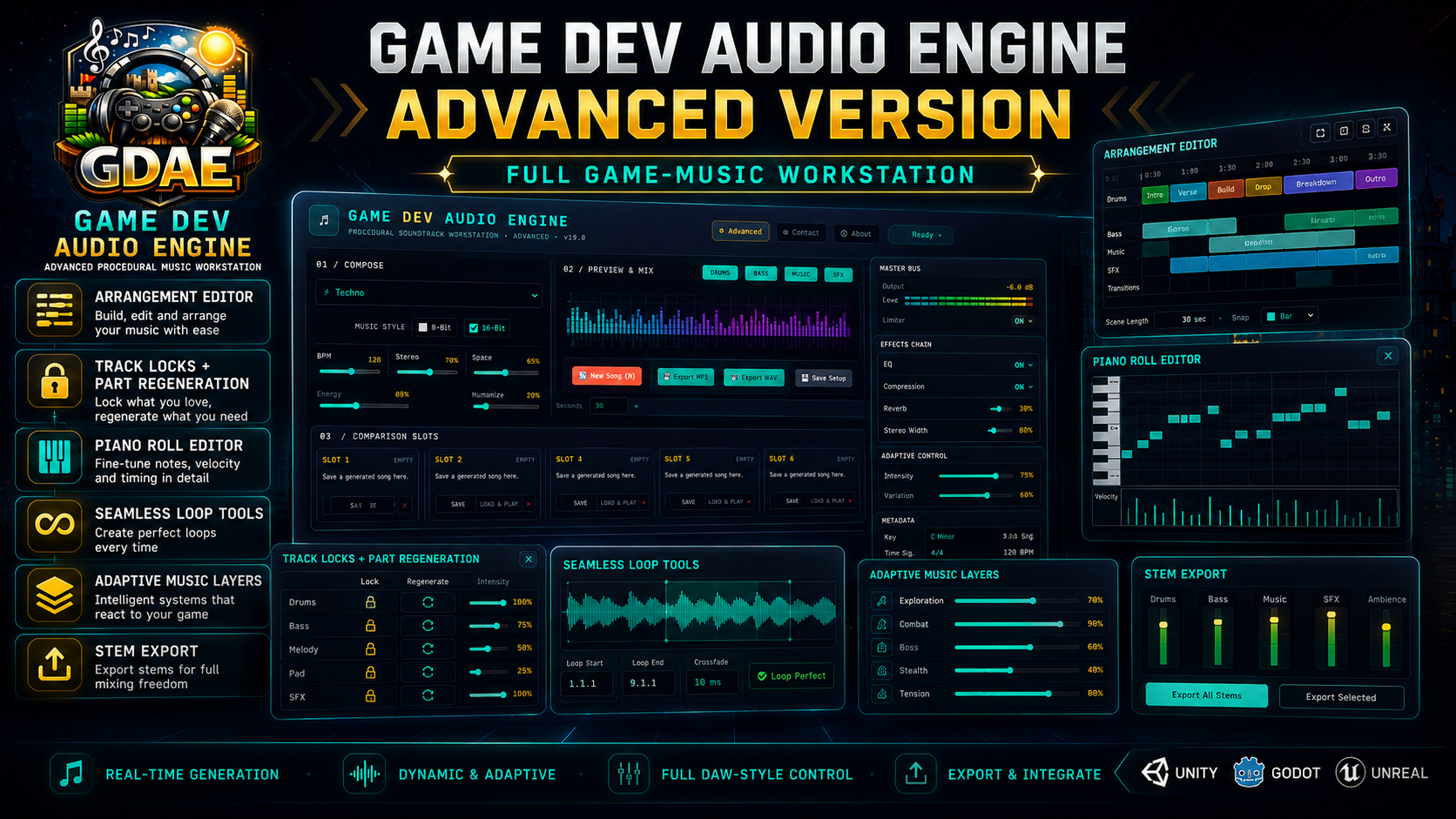
Game Dev Audio Engine Advanced includes everything in the Basic edition and expands it into a detailed music-production and game-audio design environment.
The Advanced edition is intended for users who want to go beyond generating a finished song and take direct control over its arrangement, instruments, notes, effects, automation, adaptive behavior, and exported assets.
Generate a complete composition as a starting point, then refine individual sections, audition instruments in isolation, edit notes, replace sounds, shape the mix, build loops, create adaptive layers, and export synchronized files for use inside a game engine.
What Advanced adds beyond Basic
Live individual-instrument auditioning
Every Advanced editing area includes live instrument playback controls. You can isolate and hear individual parts such as:
- Kick
- Snare
- Hi-hat
- Percussion
- Bass
- Chords
- Lead melody
- Countermelody
- Pads
- Musical effects
- Full mix
Changes can be heard immediately while playback continues, making it much easier to understand exactly which part of the song each control affects.
Detailed arrangement editing
Advanced users can inspect and modify how the composition develops over time.
- Edit song sections and section order
- Control intros, verses, builds, drops, breakdowns, and endings
- Adjust section length and intensity
- Regenerate selected parts without rebuilding the entire song
- Lock musical elements that should remain unchanged
- Compare variations while preserving the parts you already like
Piano Roll note editing
The Advanced edition includes direct note-level editing.
- View generated notes on a visual grid
- Move, add, remove, and resize notes
- Edit melodies, bass lines, chords, drums, and supporting parts
- Adjust pitch, timing, duration, and velocity
- Correct individual notes without regenerating the composition
- Audition the edited instrument while making changes
Advanced mixer and effects
Shape each instrument independently using a full mixing workspace.
- Individual channel volume
- Stereo pan and width
- Equalization
- Compression
- Reverb
- Delay
- Tone shaping
- Track isolation and muting
- Improved bass-specific mixing defaults
- Real-time preview while adjusting settings
Instrument replacement and custom sounds
Replace generated instruments with different sound sources.
- Change instruments without rebuilding the song
- Import compatible audio samples
- Assign custom sounds to musical parts
- Load supported SoundFont instruments
- Preview replacements immediately
- Create different versions of the same composition using new instrumentation
Chord and harmony editing
Advanced harmony tools provide direct control over the song’s musical foundation.
- View and modify chord progressions
- Replace individual chords
- Adjust harmonic rhythm
- Experiment with alternate progressions
- Preserve melodies while changing harmony
- Audition chord changes during playback
Custom drum sequencing
Build or refine drum patterns manually.
- Edit kick, snare, hi-hat, and percussion steps
- Create custom grooves
- Change individual drum hits
- Adjust rhythmic density
- Add fills and variations
- Preview the drum section independently
Motif and melody development tools
Control how musical ideas repeat and evolve.
- Edit generated motifs
- Create variations of a theme
- Change rhythmic and melodic development
- Refine lead and countermelody behavior
- Preserve recognizable musical ideas across song sections
Automation
Create changes that occur over time.
- Automate volume
- Automate pan
- Automate effects
- Build fades and transitions
- Add movement to pads and instruments
- Shape rises, drops, and section changes
Loop creation tools
Prepare music for seamless use in games.
- Define loop regions
- Preview loop transitions
- Refine beginnings and endings
- Create continuously repeating gameplay music
- Export loop-ready audio assets
Adaptive game-music layers
Build music that can respond to gameplay.
- Create separate intensity layers
- Prepare exploration, danger, combat, and high-intensity versions
- Keep layers synchronized
- Transition between musical states
- Export compatible stems for implementation inside a game engine
Synchronized stem exporting
Export individual musical components as separate files while keeping their timing aligned.
Possible stems include:
- Drums
- Bass
- Chords
- Melody
- Pads
- Effects
- Additional supporting parts
These files can be mixed dynamically inside Unity, Unreal Engine, Godot, RPG development tools, video editors, or other supported environments.
Expanded sound-effect and ambience tools
The Advanced edition provides additional controls for generating and refining non-musical game audio.
- Generate varied sound effects
- Create environmental ambience
- Adjust sound character and intensity
- Produce alternate variations
- Isolate and preview edited portions
- Export sounds for direct use in a project
Project and engine-oriented export options
Advanced export tools are designed for larger production workflows.
- Export full mixes
- Export synchronized stems
- Export loop-ready files
- Export supported compressed and uncompressed audio formats
- Export MIDI data for continued editing
- Save composition and settings data
- Prepare organized audio packages for game-engine implementation
Which edition is right for you?
Choose Basic when you want:
- Fast music generation
- A simple workflow
- Minimal editing
- Finished tracks without detailed production work
- An affordable tool for prototypes and smaller projects
Choose Advanced when you want:
- Full control over every instrument
- Real-time isolated instrument previews
- Note-level editing
- Custom arrangements
- Mixing and effects
- Imported instruments and samples
- Automation
- Seamless loops
- Adaptive music systems
- Synchronized stem exports
- A complete procedural game-audio production environment
Basic helps you create a song quickly. Advanced lets you turn that generated song into a fully customized, production-ready game soundtrack.
Purchase
In order to download this tool you must purchase it at or above the minimum price of $29.99 USD. You will get access to the following files:
Development log
- Update dropped.18 minutes ago
- Updating the instrument list with more real instruments and less computer genera...2 hours ago
- Found the issue.5 hours ago
- Found another bug related to some of the advanced features.6 hours ago
- Huge update. New features and bug fixes.9 hours ago
- GDAE the ogg export function has a bug.1 day ago
- V23 currently under developement.1 day ago
- Adding Volume control.1 day ago
Comments
Log in with itch.io to leave a comment.
Hi, what license is any created/generated music under? Would I own generated music 100%?
You can use the music you generate for anything in games, videos, or any other project. No selling the music as its own asset pack is my only exception.
To maintain the integrity of the licensing model and ensure fair compensation for Licensor, you are expressly prohibited from using the Generated Music in the following ways:
A. No Asset Packs or Sample Libraries: You may not package, bundle, sell, distribute, license, or provide as part of a subscription service any collection (Asset Pack) derived from Generated Music. This includes:
Beat packs.
Loop collections.
Stems libraries sold to other users.
Royalty-free music subscriptions based on Software output.
B. No Reselling Raw Songs: You may not sell or commercially distribute the Generated Music as a standalone product (e.g., uploading a track generated by the AI directly to streaming services like Beatport, Spotify for Artists, or iTunes Store, or selling it via a Bandcamp shop).
C. No Redistribution: You may not distribute Generated Music in any format where the end-user can download the file separately from your original project (e.g., you may use the track in a video that cannot be downloaded without the video, but you may not share the audio file separately for others to use).