
CedarCut Studio Linux Version
A downloadable tool
*Any issues or bugs please reach out to me.
CedarCut Studio
Offline Multilayer Video Editing for Linux
CedarCut Studio is a modern desktop video editor designed for creators who want a capable, straightforward editing workflow without relying on cloud services or constant downloads. Import your own videos, images, and audio, arrange them across a layered timeline, add text and visual overlays, mix multiple audio tracks, apply transitions, and export finished videos from one clean workspace.
The editor includes an extensive offline creative library with templates, backgrounds, text presets, overlays, music, and hundreds of categorized sound effects. Asset categories are collapsible and searchable, making it easy to navigate the collection without scrolling through one enormous list.
Build complex projects with overlapping video, image, text, overlay, music, and sound-effect layers. Position and resize visual elements directly in the preview, animate properties with keyframes, and use professional timeline operations such as ripple trimming, roll, slip, slide, insert, overwrite, replace, lift, gap removal, and split-all-at-playhead.
CedarCut Studio also includes managed proxies and preview caching for smoother editing, selectable preview quality, hardware compatibility testing, supported hardware acceleration with automatic software fallback, undo and redo, project saving and loading, multiple canvas aspect ratios, a detailed built-in user guide, and MP4 export powered by FFmpeg.
Key features
- Multilayer video, image, text, overlay, music, and SFX timeline
- Overlapping clips and picture-in-picture compositing
- Drag-and-resize editing directly in the preview
- Keyframed position, scale, rotation, opacity, cropping, text size, and volume
- Ripple, roll, slip, slide, insert, overwrite, replace, lift, and gap-closing tools
- Offline templates, backgrounds, text presets, overlays, music, and categorized SFX
- Collapsible and searchable asset categories
- Proxy generation, RAM caching, disk-cache controls, and adaptive preview quality
- Hardware acceleration detection and compatibility testing
- Automatic software fallback when hardware decoding or encoding fails
- 16:9, 9:16, 1:1, and 4:3 canvas formats
- Project saving, loading, undo, redo, duplication, splitting, and timeline zoom
- Searchable built-in user guide
- Self-contained Linux desktop application with bundled media tools
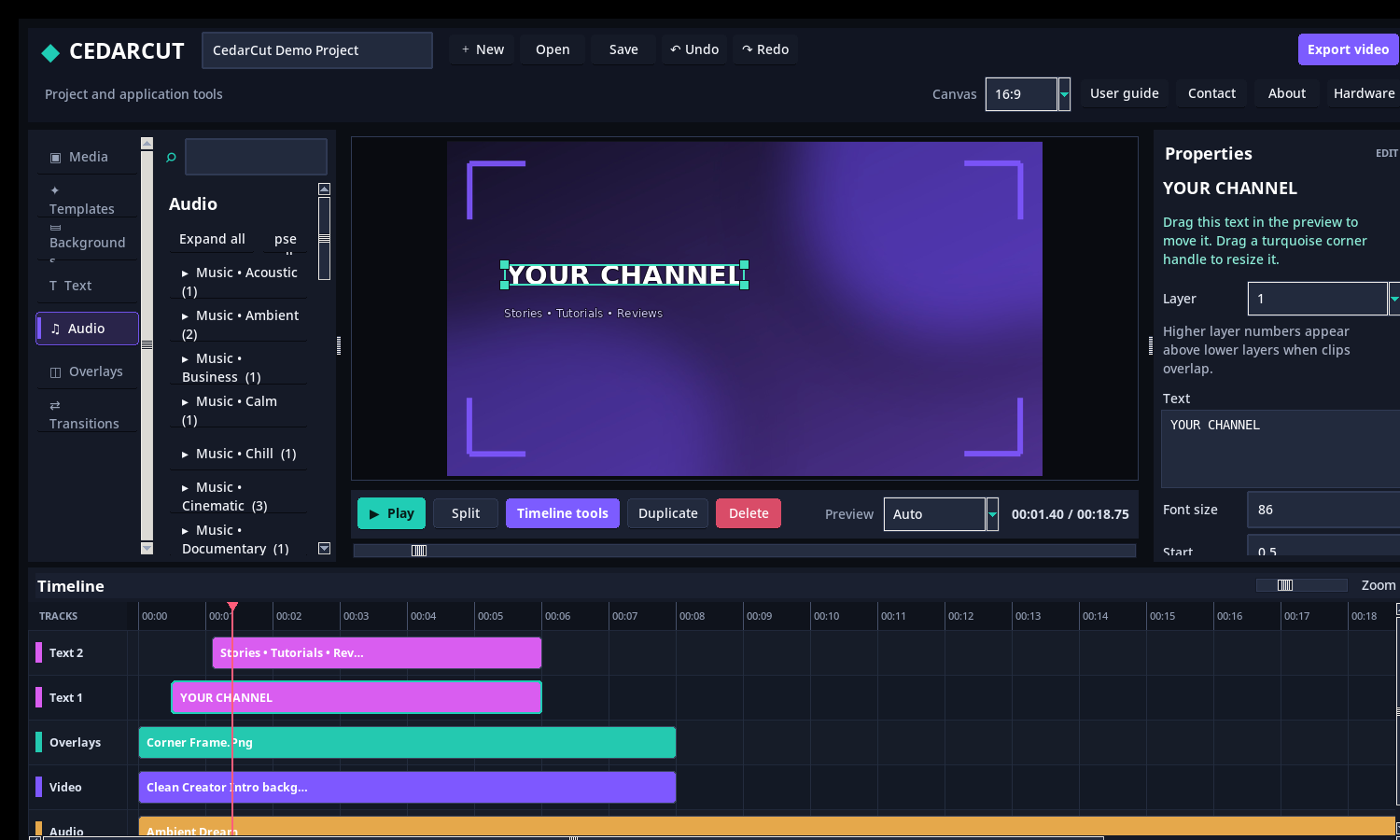
CedarCut Studio is suited to YouTube videos, gameplay edits, tutorials, short-form vertical content, presentations, promotional clips, social-media posts, and general-purpose video projects. Its dark, modern interface keeps the asset library, preview monitor, properties, playback controls, and multilayer timeline visible together so creators can focus on the edit instead of navigating a maze of separate windows.
The application and packaged runtime have been tested across timeline editing, previews, proxies, audio mixing, project persistence, transitions, exports, scrolling, hardware fallback, and the main graphical interface.
This was developed on and for Linux Mint. It may work on other Distros.
Purchase
In order to download this tool you must purchase it at or above the minimum price of $7.50 USD. You will get access to the following files:
Development log
- Update. New optimized and enhanced version available.7 minutes ago
- Big Update coming today or tomorrow. V0.6.011 hours ago
- Initial Release.21 hours ago
Leave a comment
Log in with itch.io to leave a comment.